A Day in the Life
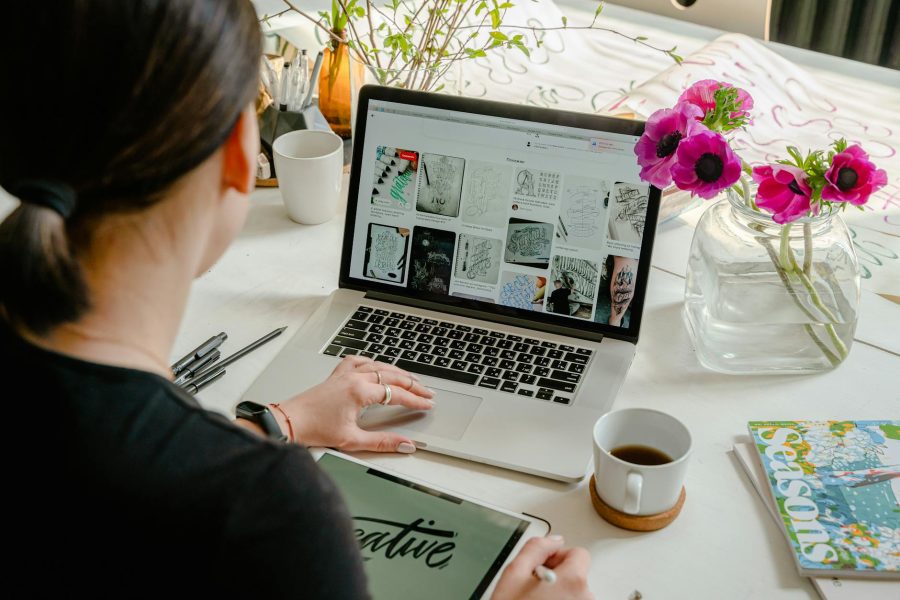
Being a digital artist requires a unique set of skills and a dedicated approach to the craft. Let’s take a glimpse into the daily routine and workspace setup of a digital artist.
Daily Routine
The daily routine of a digital artist can vary depending on their specific projects and deadlines. However, there are a few common elements that can be found in the daily life of most digital artists. Here is a typical daily routine:
-
Morning Preparation: Digital artists often start their day by gathering inspiration and planning their tasks. They may browse through online art communities, visit art galleries, or explore social media platforms for digital art inspiration.
-
Workspace Setup: Once inspired, digital artists proceed to set up their workspace. This involves ensuring that their computer, tablet, or other digital art devices are properly connected and functioning. They may also organize their physical workspace, such as arranging their drawing tablet, pens, and any other tools they require.
-
Project Execution: With their workspace ready, digital artists dive into their ongoing projects. This entails working on sketches, creating digital illustrations, or editing and retouching images using their preferred digital art software. Digital artists often work in iterations, refining their work until they achieve the desired outcome.
-
Breaks and Self-Care: Like any creative profession, taking regular breaks is important for a digital artist’s well-being and productivity. They may step away from their workspace to stretch, relax their eyes, or engage in activities that inspire them. Self-care practices such as staying hydrated and getting fresh air are also crucial.
-
Project Management: Digital artists allocate time to manage their projects, which involves organizing files, communicating with clients or collaborators, and ensuring that the project is progressing according to the timeline. They may also update their digital artist portfolio with completed works or works-in-progress.
Workspace Setup
Creating an optimal workspace is vital for digital artists to unleash their creativity and work efficiently. Here are some key elements to consider when setting up a workspace:
-
Ergonomics: Digital artists spend long hours at their desks, so it’s important to prioritize comfort. They may invest in an ergonomic chair and an adjustable desk to maintain good posture and avoid strain on their neck, back, and wrists.
-
Lighting: Adequate lighting is essential for color accuracy and reducing eye strain. Digital artists may set up their workspace near a window for natural light or use adjustable LED lamps with cool or natural light settings.
-
Display Calibration: Ensuring accurate color representation is crucial for digital artists. They may use color calibration tools to calibrate their computer monitors, ensuring that the colors they see on screen match the intended output.
-
Storage and Organization: Digital artists deal with large files and a variety of digital assets. They may invest in external hard drives or cloud storage solutions to keep their files organized and easily accessible. Physical organization, such as cable management systems and storage compartments, can also contribute to a tidy workspace.
By following a structured daily routine and creating a well-designed workspace, digital artists can enhance their productivity, focus, and creative output. With the right environment and mindset, they can fully immerse themselves in the world of digital art and bring their artistic visions to life.
Essential Tools
To excel in the world of digital art, having the right tools is essential. This section will explore two crucial components for digital artists: digital software and hardware equipment.
Digital Software
Digital art software provides the necessary tools and features for artists to create stunning digital artworks. There are various software options available, each with its own strengths and specialties. Some popular digital art software includes:
| Software | Description |
|---|---|
| Photoshop | Widely regarded as the best overall digital art software, Photoshop offers a comprehensive range of features and AI tools for image editing. It is highly versatile and works across different devices (Creative Bloq). |
| Procreate | Specifically designed for iPad, Procreate is considered the best digital art app for iPad users. It provides a powerful and intuitive interface with a wide array of tools and brushes, allowing artists to simulate different painting and drawing styles (Creative Bloq). |
| Rebelle 7 | An affordable option for digital painting software, Rebelle 7 aims to replicate the behavior of real-world paint. It offers various brush presets and effects, including metallic paints and ray-traced canvases. It provides an authentic painting experience for artists (Creative Bloq). |
| Affinity Photo | Affinity Photo is a one-time purchase alternative to Photoshop, offering similar power and performance. It is compatible with PSD files and can handle high-resolution images. It is known for its smooth performance, even on older machines (Creative Bloq). |
| Corel Painter 2023 | Specialized software for digital painting, Corel Painter 2023 replicates the behavior of traditional paint. It provides tools and applications for artists to create realistic digital artworks. The latest update includes improvements in paint flow and mixing, as well as enhanced performance on M1 Apple Mac (Creative Bloq). |
These software options offer a range of features and capabilities, catering to different artistic styles and preferences. When choosing digital art software, consider your specific requirements and artistic goals to find the best fit for your needs.
Hardware Equipment
In addition to digital software, having the right hardware equipment is crucial for digital artists. Here are some essential hardware components for digital art:
-
Computer or Tablet: A computer or tablet is the primary device for creating digital art. It should have sufficient processing power and memory to handle the demands of digital art software. Graphics tablets or pen displays offer a more tactile experience and precise control for drawing directly on the screen.
-
Graphics Tablet or Pen Display: A graphics tablet or pen display allows artists to draw with a stylus directly onto a sensitive surface. This provides a more natural and intuitive drawing experience compared to using a mouse or trackpad.
-
Stylus: A stylus is an essential tool for digital artists, providing precise control and pressure sensitivity. Some styluses offer additional features such as customizable buttons and tilt recognition, allowing for more versatile and expressive artwork.
-
Monitor: A high-quality monitor with accurate color representation is crucial for digital art. It is recommended to use a monitor with an IPS panel for better color accuracy and wide viewing angles.
-
Scanner or Camera: If you work with traditional art mediums and want to digitize your artwork, a scanner or camera is necessary to capture and import your physical artwork into the digital realm.
Investing in reliable and high-quality hardware equipment ensures a smooth and enjoyable digital art experience. It is important to choose equipment that suits your artistic needs and budget.
By utilizing the right digital software and hardware equipment, digital artists can unlock their creative potential and explore the endless possibilities of digital art. Remember to regularly update your software and maintain your hardware to ensure optimal performance.
Techniques and Skills
When it comes to digital art, mastering the right techniques and skills can greatly enhance your artistic abilities. In this section, we will explore two fundamental aspects of digital art: color theory basics and texture application.
Color Theory Basics
Understanding color theory is essential for creating visually appealing and harmonious artwork. Color theory is a systematic way to create harmonious color schemes and involves understanding the physics of light and how our eyes and brain perceive colors (Serena Archetti).
At the core of color theory is the color wheel, a visual tool that artists use to understand color relationships. There are different types of color wheels, such as the RGB color wheel, CMYK color wheel, and traditional pigment color wheel, each with its own strengths and weaknesses. The color wheel consists of primary, secondary, and tertiary colors, which can be combined to create a wide range of hues, tints, and shades.
Color schemes, also known as color harmonies, are groups of colors that work together to create a pleasing look, evoke a feeling, or guide attention. Popular color schemes include monochromatic, analogous, complementary, triadic, split complementary, and double complementary color harmonies. Each color scheme has its own unique characteristics and can evoke different moods or emotions in a composition.
Understanding warm and cool colors is another important aspect of color theory. Warm colors, such as red, orange, and yellow, can create an energetic or dangerous feel in a painting, while cool colors, such as blue, green, and purple, can create a calming or serene feeling. Warm colors tend to attract the viewer’s eye, while cool colors recede.
Color psychology explores the way different colors can affect our emotions, moods, and thoughts. For example, blue can represent stability and peace, green can symbolize prosperity and hope, and red can evoke passion and love. Understanding the psychological impact of colors can help you effectively communicate your artistic intentions.
Texture Application
Texture plays a vital role in digital art, adding depth and visual interest to your creations. There are various techniques for applying texture to your digital artwork.
Utilizing texture brushes is one way to add texture to your digital paintings. Texture brushes provide total control over the artwork, offering natural and organic effects similar to traditional canvas painting. By experimenting with different brush settings, layer modes, and colors, you can achieve a wide range of textural effects.
Another method for incorporating texture is by adding a texture image on top of your digital painting. This involves selecting a texture photo and adjusting layer modes, opacity, and blending options to seamlessly integrate the texture into your artwork. A wide range of texture resources are available online, offering an extensive library of textures for artists to choose from.
By mastering the techniques of color theory and texture application, you can elevate your digital art to new heights. Experiment with different color schemes, explore the emotional impact of colors, and incorporate various texture techniques to create visually captivating and engaging artwork. Remember, practice and experimentation are key to honing your skills as a digital artist.
Industry Insights
As a digital artist, it’s essential to stay up to date with the latest software options and techniques to enhance your creative process. In this section, we will explore some of the best software options for digital art and the use of textures in digital art.
Best Software Options
When it comes to digital art software, there are several options available, each with its own unique features and capabilities. Here are some of the top software choices for digital artists:
| Software | Features |
|---|---|
| Photoshop | Considered the best overall digital art software, Photoshop offers a wide range of features and AI tools for image editing. It is widely used in the industry and works across various devices. |
| Procreate | Regarded as the best digital art app for iPad, Procreate provides a powerful and user-friendly interface with an extensive collection of tools and brushes. It can simulate different painting and drawing styles. |
| Rebelle 7 | An affordable option for digital painting software, Rebelle 7 is designed to mimic the behavior of real-world paint. It offers various brush presets and effects, including metallic paints and ray-traced canvases. |
| Affinity Photo | For those seeking a one-time purchase alternative to Photoshop, Affinity Photo offers similar power and performance. It is compatible with PSD files and can handle high-resolution images. It also runs well on older machines. |
| Corel Painter 2023 | Corel Painter 2023 is specialized software for digital painting, featuring tools and applications that replicate the behavior of traditional paint. The latest update includes improvements in paint flow and mixing, as well as enhanced performance on M1 Apple Mac. |
Information sourced from Creative Bloq
These software options provide a wide range of tools and features to support your digital art journey. It’s important to explore and experiment with different software to find the one that aligns with your artistic vision and workflow.
Textures in Digital Art
Textures play a vital role in adding depth and visual interest to digital art. There are various ways to incorporate textures into your digital paintings, offering unique effects and enhancing the overall aesthetic. Here are two common techniques:
-
Texture Brushes: Utilizing texture brushes in digital paintings allows for precise control over the artwork, providing natural and organic effects similar to traditional canvas painting. This technique requires practice to perfect and involves experimenting with layer modes and colors.
-
Texture Overlay: Incorporating a texture image by adding a texture photo on top of the digital painting can yield a variety of effects, ranging from natural to dramatic. Adjusting layer modes and opacity can further enhance the integration of the texture. Online resources such as Etsy.com offer a wide range of textures for artists to choose from, but it’s important to be aware of any usage restrictions or additional charges for commercial usage.
Information sourced from Ioanna Ladopoulou
By exploring different software options and incorporating textures into your digital art, you can expand your creative possibilities and create unique and captivating artwork. Keep experimenting and refining your techniques to develop your own signature style in the digital art world. Remember to also consider building a digital artist portfolio to showcase your skills and attract potential clients or opportunities.
Creative Process
The creative process is a vital aspect of a digital artist’s journey. It involves various stages, from finding inspiration to ensuring workflow efficiency. Let’s explore these two key elements of the creative process.
Finding Inspiration
Inspiration serves as the spark that ignites an artist’s imagination and fuels their creativity. Digital artists seek inspiration from a variety of sources, such as nature, photography, music, or other artworks. Browsing online platforms dedicated to digital art inspiration can also provide a wealth of ideas and stimulate new concepts.
By observing and studying different art styles, techniques, and subject matters, artists can expand their visual vocabulary and develop their unique artistic voice. It’s important to explore a wide range of sources to broaden perspectives and avoid falling into creative ruts. Remember to always credit and respect the original creators when using external inspiration.
Workflow Efficiency
Efficiency in workflow can significantly impact a digital artist’s productivity and the quality of their work. Here are some tips to enhance workflow efficiency:
-
Organize your digital files: Creating a well-structured folder system and naming conventions for your files helps you locate and access your artwork easily. Consider organizing your files by project, date, or subject matter, depending on what works best for you.
-
Utilize layers: Digital art software provides the advantage of working with layers. Using layers allows you to separate different elements of your artwork, making it easier to make adjustments and experiment without affecting the entire composition. Take advantage of layer management tools to organize and label your layers effectively.
-
Keyboard shortcuts: Familiarize yourself with the keyboard shortcuts of your chosen digital art software. Mastering these shortcuts can save you valuable time and streamline your workflow by reducing reliance on manual mouse movements and menu navigation.
-
Customize your workspace: Tailor your workspace to suit your preferences and optimize your workflow. Arrange your tools, palettes, and windows in a way that allows for easy access to the features you frequently use. Experiment with different layouts until you find one that enhances your productivity.
-
Regular breaks: Taking regular breaks during long creative sessions is important for maintaining focus and preventing burnout. Stepping away from your artwork for a few minutes allows you to return with a fresh perspective and renewed energy.
By incorporating these practices into your creative process, you can improve efficiency and maximize your artistic potential. Remember, finding inspiration and optimizing your workflow are ongoing processes that evolve with your artistic journey. Don’t be afraid to experiment, adapt, and refine your methods to suit your unique style and artistic goals.
Keep exploring different techniques, seeking inspiration, and refining your workflow to revolutionize your art and unleash your creativity. Don’t forget to showcase your digital art portfolio to share your talent with the world (digital artist portfolio).
Tips and Tricks
To excel in the world of digital art, it’s essential to not only master the technical skills but also enhance productivity and maintain creativity. Here are some tips and tricks that can help digital artists reach their full potential.
Enhancing Productivity
-
Organize Your Workspace: Keeping your digital art workspace tidy and well-organized can significantly enhance your productivity. Arrange your tools, brushes, and reference materials in an easily accessible manner, allowing you to work efficiently without distractions.
-
Utilize Keyboard Shortcuts: Familiarize yourself with keyboard shortcuts specific to your preferred digital art software. These shortcuts can save you valuable time by streamlining your workflow and reducing the need to navigate through multiple menus.
-
Create Custom Brushes and Presets: Take advantage of custom brushes and presets in your digital art software. By creating and saving your own brushes, textures, and color palettes, you can quickly access them for consistent and efficient artwork creation.
-
Establish a Routine: Set a regular schedule for your digital art practice. Consistency is key to improving your skills and maintaining productivity. Whether it’s dedicating a specific time each day or a few dedicated days per week, make sure to allocate time for focused digital art sessions.
Maintaining Creativity
-
Seek Inspiration: Explore various sources of digital art inspiration to spark your creativity. Follow other digital artists, browse art communities, visit galleries, or immerse yourself in different art styles and genres. Drawing inspiration from diverse sources can help broaden your artistic horizons.
-
Experiment and Take Risks: Don’t be afraid to step out of your comfort zone and try new techniques, styles, or subject matters. Experimentation allows you to push boundaries and discover unique approaches that can set your digital art apart.
-
Take Breaks and Rest: Avoid burnout and maintain creativity by taking regular breaks. Stepping away from your work and engaging in other activities can refresh your mind and prevent creative block. Allow yourself time to rest and recharge, as it often leads to renewed inspiration and fresh ideas.
-
Join Art Communities: Connect with other digital artists by joining online art communities or participating in local art groups. Engaging with fellow artists can provide valuable feedback, constructive critiques, and a sense of camaraderie. Sharing your work and receiving input from others can stimulate creativity and encourage growth.
By incorporating these tips and tricks into your digital art practice, you can enhance your productivity, maintain creativity, and continue to evolve as a digital artist. Remember to adapt these strategies to suit your individual needs and artistic style, allowing you to unlock your full potential and revolutionize your art.